
Power Platform Dev Weekly #283


Welcome to the Power Platform Developers Weekly!
As we wrap up the year, this will be our final edition of Power Platform Dev Weekly before we take a short winter break. We’ll be back refreshed in the new year with more insights, updates, and community highlights. Thank you for reading, sharing, and supporting us throughout the year – we truly appreciate being part of your weekly routine. Wishing you a restful holiday season and a great start to the year ahead.
In this issue, our authors each share a short thought, tip, or insight—something they’re excited about and want to pass along to you.
Another year done, full of AI and change. Our little bi-weekly recap has gone from strength to strength, thanks to the content creators and our subscribers. We appreciate every one of the over 6000 of you that subscribe!
It is a time for family, friends and welcoming in the new in our house. I hope you relax and take stock of your year like I do and go into January re-invigorated for what will be another awesome year!
This year has been all about AI and Copilot, but honestly, I haven’t explored the Copilot space as much as I would like. I am really looking forward to learning more and getting hands-on in 2026! For now, I am excited about the Christmas and New Year break—time to relax and recharge. Big thanks to everyone who shared amazing content this year. Here’s to more learning and collaboration in the new year! Happy holidays!
In a year of Copilot here, there and everywhere, it’s been fun to see the blogging landscape change and watch people find their niche. 2025 moved at a lightning pace and I’m really excited to see what 2026 brings us - having said that, I’m also looking forward to a nice break with my family. All the best and see you in 2026!
Thank you to everyone who been putting out content in blogs, videos and social media this year! We (and I think everyone who subscribes to PPDevWeekly!) really appreciate the time and effort that goes into the thought-through, in-depth articles that we love and helps raise up everyone along with us. Regardless of what’s going on with the latest AI tech, a good understanding of the fundamentals is still really important and I’m looking forward to seeing more of this in 2026.
This year’s been absolutely packed with AI and Copilot content, hasn’t it? While it’s brilliant to see the ecosystem grow, I’m genuinely hoping we’ll see more developer-focused technical posts next year. Give me a deep dive into APIs, clever workarounds for tricky bugs, or creative solutions to real-world problems. There’s something special about posts that get your hands dirty with code rather than just scratching the surface. Here’s to more practical content in the new year.
This year personally for me has been filled with lot of big milestones – biggest one of all was having our first kid (Evaan). Going through sleepless nights plus building something very interesting for the community (yes lets keep that a surprise until next year; but promise soon to be revealed). I’d say I am content with how the year turned out to be. Hope it was the case with everyone else as well. I sincerely thank each and every subscriber for reading our posts week after week and to all the content creators without whom this newsletter cease to exists. I wish all of you a relaxing holiday; take some time-off work; focus on family, friends & building connections.
Microsoft feature releases and announcements
We need to follow more content creators. If you know anyone who writes blogs or creates videos, please fill out the form on their behalf provided on this website so we can start tracking them.
We hope you enjoy the content of this week.
— PP Dev Weekly Team
🥇 Cover Story

Copilot Studio: Connect An Azure SQL Database As Knowledge
by Matthew Devaney
Want your Copilot to deliver answers backed by real enterprise data? This guide from Matthew shows how to connect an Azure SQL Database as a knowledge source in Copilot Studio. By configuring a knowledge connector and mapping SQL data, you can turn structured information into conversational insights—making your AI smarter, faster, and more relevant for business needs.
💎 Model Driven Apps & Dataverse
by Pieter Veenstra
In Dynamics 365 and the Power Platform, solutions are the primary vehicle for application lifecycle management (ALM). As a best practice, direct changes to the base (parent) solution in production or UAT environments should be avoided. Instead, every hotfix or small enhancement should be applied via patches.
Make Fields Required In Your Custom Pages To Prevent Missing Data
by Megan Walker
If you work on Model-driven Apps (MDA) it’s pretty simple to just set a field as required on a table. With Custom Pages you need a little bit more than that. In this post we will look at a few tips to make fields required in your custom pages, or at least give the appearance of them being required.
🏋️♂️ Canvas Apps
Input and Output Parameters in Power Apps flows
by Pieter Veenstra
Want seamless communication between screens and components? Learn how input and output parameters can make your apps dynamic and reusable. This guide shows you how to pass data effortlessly, simplify development, and create flexible solutions for complex business needs.
🤖 Copilot
Extending Copilot with Dataverse grounded declarative agents
by Lewis Baybutt
Lewis Baybutt shows how to build declarative agents with the Microsoft 365 Agents Toolkit + TypeSpec, then ground them in Dataverse so Copilot can reason over structured business data (e.g., Dynamics 365 tables).
😎 Power Automate
5 fundamental Power Automate ideas that will make your flows better!
by Pieter Veenstra
Pieter discusses new ideas and best practices for improving Power Automate flows. It emphasizes simplifying flow design, leveraging templates, and using dynamic content effectively to reduce complexity. Key suggestions include optimizing triggers, minimizing unnecessary actions, and implementing error handling for reliability.
👍 Everything else in Power Platform
Extending the Power Apps Timeline: Displaying Attendance Records with a Custom Connector
by Kailash Ramachandran
This article explains how to extend the Power Apps timeline by displaying attendance records using a custom connector. It walks through building the connector, integrating it with Dataverse, and configuring the timeline control to show real-time attendance data. The result is a richer, more interactive user experience for tracking participation directly within Power Apps.
🎮 Other Interesting Articles
Fix SharePoint’s 5000-Item Limit in Dynamics 365 (2026 Guide) - Inogic
📢 Call for Speakers
A look at CFS closing soon
European Power Platform Conference 2026 - Closes 2026-01-14
Dynamics Minds - Closes 2026-01-15
🎥 Videos
🤳Socials of the week
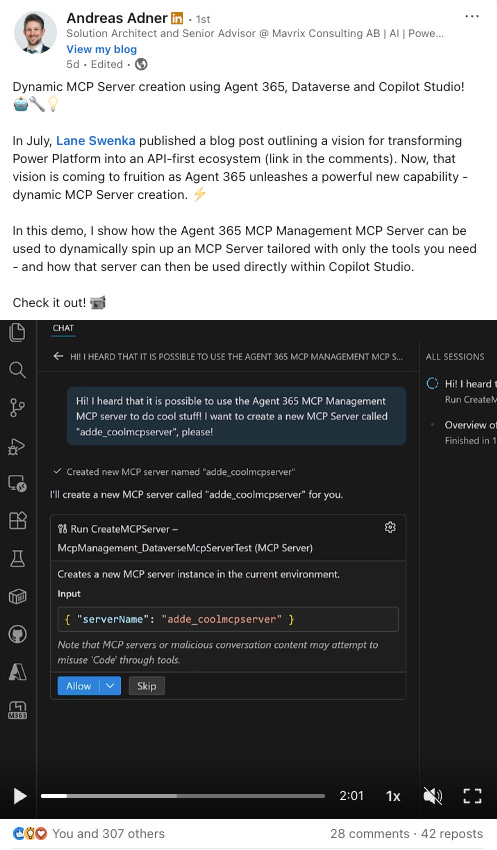
➡️ LinkedIn Post by Andreas Adner
✨ Thanks for reading
If you’re enjoying this newsletter, it would mean a lot to share it with your friends & colleagues and ask them to subscribe to it.